 文章目录效果预览核心代码CSS代码jQuery代码这里是演示标题这里是子标题一这里是孙标题一这里是孙标题二这里是子标题二
在写文章的时候,为了结构更加清晰,我们会添加h2-h6标签来展示段落标题,我们把这些段落标题整合起来做成文章目录并加上锚点,可以有效帮助访客快速了解文章的内容结构,提升阅读体验。
本文分享一段免插件生成WordPress文章目录的代码,可以将h2-h6标签自动生成文章目录索引,并可实现多层级展示。
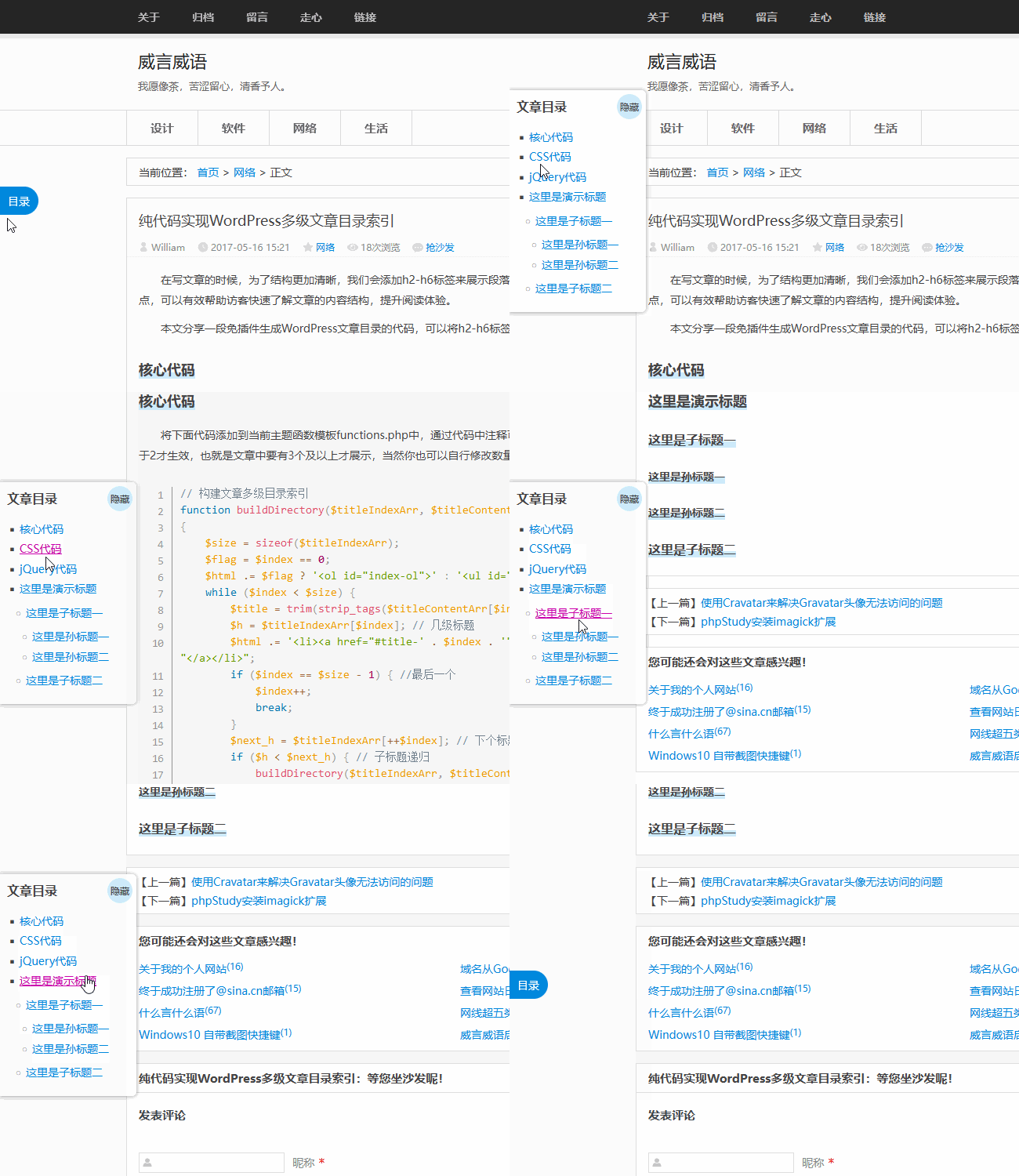
将下面代码添加到当前主题函数模板functions.php中,通过代码中注释可以知道文章目录是获取h2-h6的标题,同时h标签的个数大于2才生效,也就是文章中要有3个及以上才展示,当然你也可以自行修改数量。
// 构建文章多级目录索引function buildDirectory($titleIndexArr, $titleContentArr, &$index, &$html) $size = sizeof($titleIndexArr); $flag = $index == 0; $html .= $flag ? ' ol ' : ' ul while ($index $size) { $title = trim(strip_tags($titleContentArr[$index])); // 标题内容 $h = $titleIndexArr[$index]; // 几级标题 $html .= ' li a ' . $title . " /a /li if ($index == $size - 1) { //最后一个 $index++; break; $next_h = $titleIndexArr[++$index]; // 下个标题是几级标题 if ($h $next_h) { // 子标题递归 buildDirectory($titleIndexArr, $titleContentArr, $index, $html); if ($index = $size || $h $titleIndexArr[$index]) { break; } else if ($h $next_h) { break; $html .= $flag ? ' /ol ' : ' /ul function article_index($content) $html = ''; $matches = array(); // 当前设置 [2-6]即 h2 到 h6 可以自己修改下面正则 $r = '/ h([2-6])(.*?) (.*?) \/h[2-6] /is'; // preg_match_all 函数用于执行一个全局正则表达式匹配。$r=正则,$content=文章内容,$matches=作为输出参数输出所有匹配结果 preg_match_all($r, $content, $matches); $num_match = count($matches[0]); // 用于文章页,同时h标签个数大于2个才生效 if ( is_single() && ($num_match 2) ) { foreach ($matches[1] as $key = $value) { // strip_tags() 函数剥去字符串中的 HTML、XML 以及 PHP 的标签 $title = trim(strip_tags($matches[3][$key])); //文章标题 // 文章原标题添加锚点 $content = str_replace($matches[0][$key], ' h' . $value . '' . $matches[2][$key] . ' ' . $title . ' /h' . $value . ' ', $content); $titleIndexArr = $matches[1]; $titleContentArr = $matches[3]; $index = 0; $html .= "\n".' div 目录 /div div div strong 文章目录 /strong span 隐藏 /span /div buildDirectory($titleIndexArr, $titleContentArr, $index, $html); $html .= ' /div '."\n"; return $html. $content;add_filter('the_content', 'article_index');CSS代码将文章目录固定在浏览器左侧中间,这样外观比较独立,不容易受原主题样式的影响,按钮颜色可以根据自己使用的主题颜色调整,保持统一。
#article-index{position:fixed;top:50%;transform:translateY(-50%);left:0;width:156px;max-height:76%;padding:0 10px;font-size:14px;border-radius:0 6px 6px 0;background-color:#fff;box-shadow:0 0 5px rgba(0, 0, 0, .4);overflow:auto;z-index:99;display:none;}#article-index-top{position:sticky;top:0;z-index:92;background:#fff;}#article-index strong{display:block;font-size:16px;padding:10px 0 12px 5px;}#index-ol{list-style:square;}#index-ol li{padding:0;margin-left:16px;line-height:24px;position:relative;list-style-position:inherit;word-break:break-all;}#index-ul{list-style:circle;margin:0;padding:5px 0 5px 8px;}#index-ul li:before{display:none;}#article-index-show{position:fixed;top:50%;transform:translateY(-50%);left:0;display:block;width:50px;height:36px;line-height:36px;text-align:center;font-size:14px;border-radius:0 36px 36px 0;color:#fff;background-color:#0088dd;cursor:pointer;}#article-index-hide{position:absolute;right:0;top:5px;display:block;width:32px;height:32px;line-height:32px;text-align:center;font-size:12px;border-radius:100%;background-color:#d2ddff;cursor:pointer;}#article-index-hide:hover{color:#fff;background-color:#0088dd;}jQuery代码需要加载jquery.js
//文章目录展示切换jQuery(document).ready(function(){ jQuery("#article-index-hide").click(function(){ jQuery("#article-index").hide(100); jQuery("#article-index-show").show(200); jQuery("#article-index-show").click(function(){ jQuery("#article-index").show(200); jQuery("#article-index-show").hide(100);//文章目录锚点点击平滑滚动jQuery(document).on('click', '#article-index a[href^="#"]', function(e) { varjQuery(this).attr('href'); var $id = jQuery(id); if ($id.length === 0) { return; e.preventDefault(); var$id.offset().top; jQuery('body, html').animate({scrollTop: pos});这里是演示标题这里是子标题一这里是孙标题一这里是孙标题二这里是子标题二